How to Clear and Remove the Divi Navigation Menu
This includes the phone number link which is often on a one-page site.
Click here for how to hide the Divi Navigation Menu, when clearing the menu is not important.
BEFORE REMOVING:
First, if required, we will clear the menu items from a previous divi install.
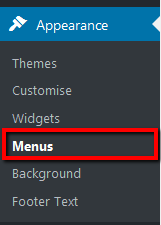
Log in to your WP Admin panel. Navigate to Appearance>Menus.
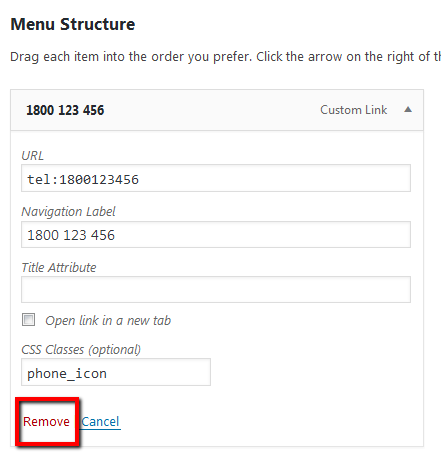
If there are previous menu items existing in the install that relate to a different site, click on the menu item’s dropdown arrow to open. Then remove and save menu changes. We will now hide the menu, so if the menu item is generic and may be useful to future changes, you could leave it there for easier future editing.
STEP 1:
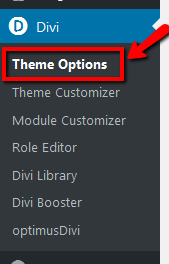
Navigate to Divi>Theme Options.
STEP 2:
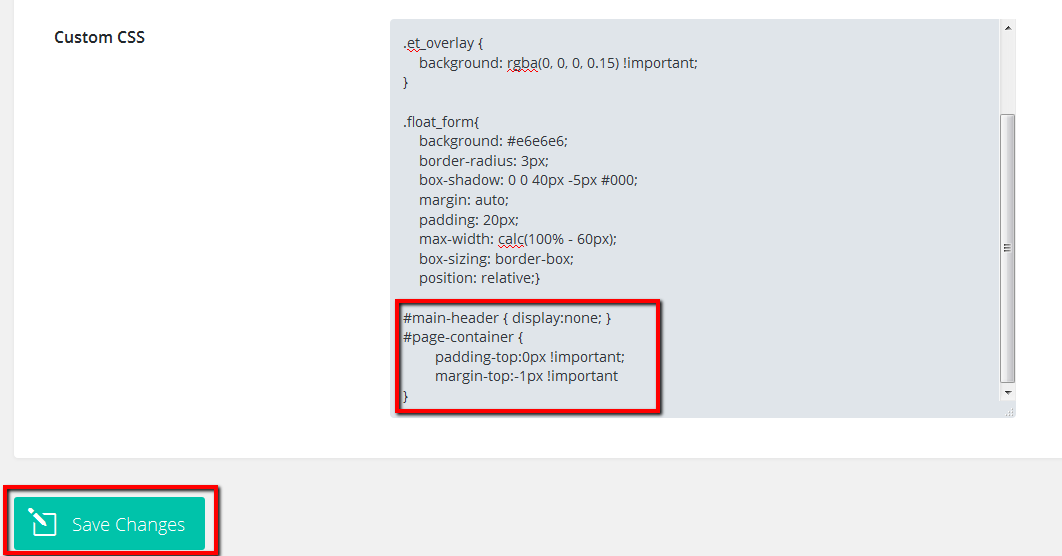
Scroll down to “Custom CSS” and paste in the following CSS snippet.
#main-header { display:none; }
#page-container {
padding-top:0px !important;
margin-top:-1px !important
}
Save changes.
Thank you. It Worked Perfectly.. 🙂
Hello, thank you. How could see the primary menu only in mobile?
Hola, cómo puedo hacer para ver solo el primary menú en mobile?
gracias.
Hi Claudio,
Try placing the screen size parameter around it (media query) so that it only applies to screen sizes larger than mobile:
@media (min-width: 768px) {
}
Like this:
@media (min-width: 768px) {
#main-header { display:none; }
#page-container {
padding-top:0px !important;
margin-top:-1px !important
}
}
Awesome, thank you!
Just what I was looking for! Thanks!
Hi, Thank you.
How could hide the menu mobile on DIVI?
Thanks !!!
Try this:
@media (max-width: 767px) {
#main-header { display:none; }
#page-container {
padding-top:0px !important;
margin-top:-1px !important
}
}
Thanks a lot, really appreciate it!
What code would I use to remove it from the Mobile AND Tablet devices?
Hi Joel,
You may find these instructions more helpful for your needs.
But for a summary of the code you need:
/* Hide Divi Main Navigation Menu on mobile and tablet screen size only */
/* phone to medium tablet styles */
@media (max-width: 767px) {
#main-header { display:none; }
#page-container {
padding-top:0px !important;
margin-top:-1px !important
}
}
OR
/* Hide Divi Main Navigation Menu on mobile and tablet screen size only */
/* phone to large tablet styles */
@media (max-width: 991px) {
#main-header { display:none; }
#page-container {
padding-top:0px !important;
margin-top:-1px !important
}
}
Viewport sizes vary across devices, so you may need to alter the max-width of the media size in the code to get what you need. If you need larger than 991px, you could even try 1023px:
/* Hide Divi Main Navigation Menu on mobile and tablet screen size only */
/* hopefully everything except standard desktop sizes */
@media (max-width: 1023px) {
#main-header { display:none; }
#page-container {
padding-top:0px !important;
margin-top:-1px !important
}
}
More info and explanation here.
Works perfectly. Super appreciate you writing this tutorial up, saved me a headache. All the best!
Worked like a charm. Your the best!
yahoo, worked, thanks!